

User Details and Update
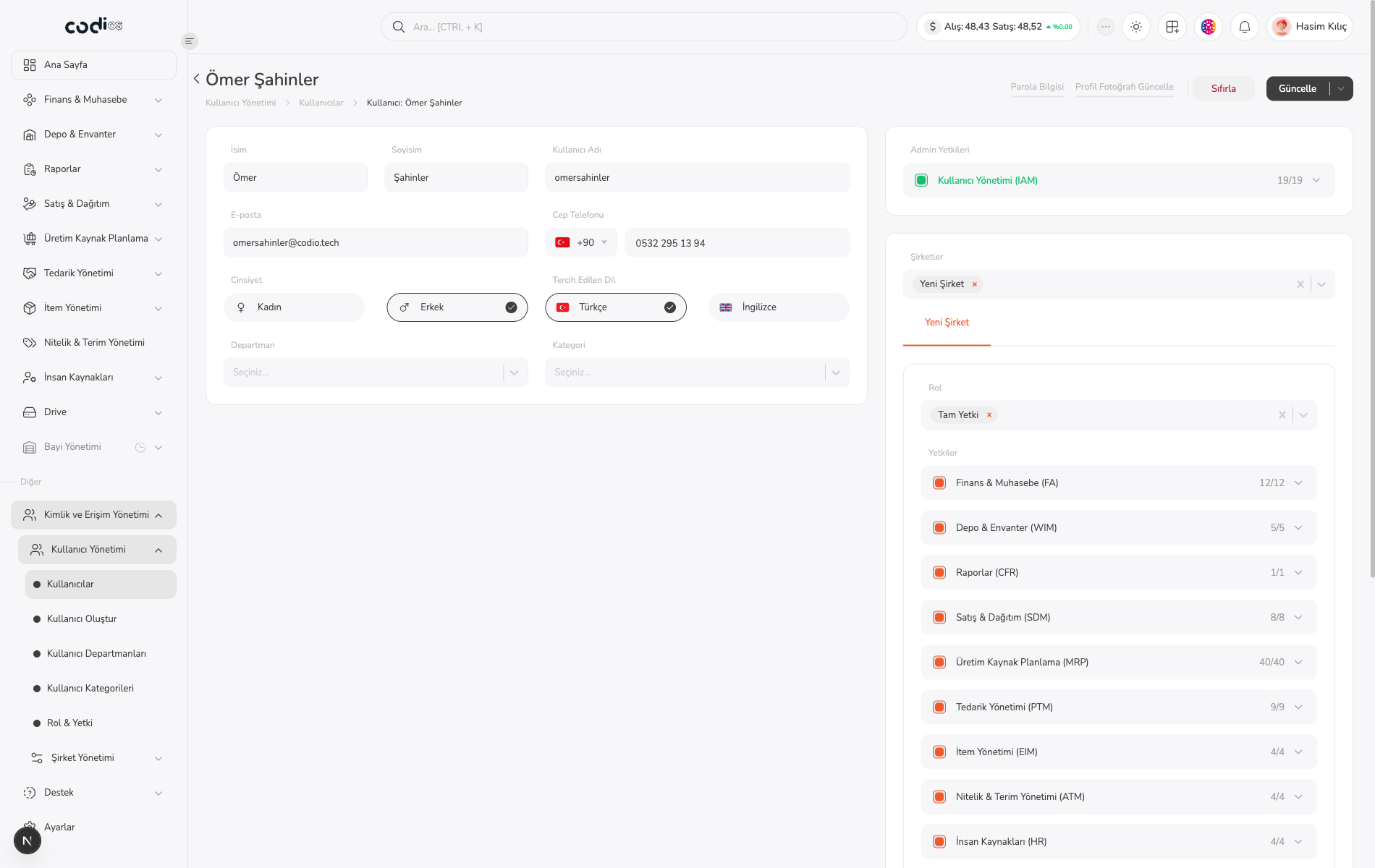
Open a user from the list to review or update identity details, classification, IAM permissions, and company relationships.
Open the details
- Select a user name on Kullanıcılar.
- Review the existing values on Kullanıcı Güncelle.
- Check İsim, Soyisim, Kullanıcı Adı, E-posta, and Cep Telefonu.
- Review Departman, Kategori, Admin Yetkileri, and Şirketler together.
 1234
- 1. User identity and contact details.
- 2. Department and category selections.
- 3. IAM permission scope assigned to the user.
- 4. Company relationships and company-based role/permission area.
Update the user
- Edit the relevant fields.
- Review selected permissions before changing the access scope.
- Use Sıfırla to discard changes or Güncelle to save them.
- Use Geri to return to the list without changing data.
Manage the company relationship
Review existing company relationships in Şirketler. The Yeni Şirket tab is visible in this session, but it did not open an independent company creation form, so its fields and save result could not be verified.
Back to top