

Create Current Account
Use Create Current Account to open a record for a customer, supplier, or business partner.
Complete account information
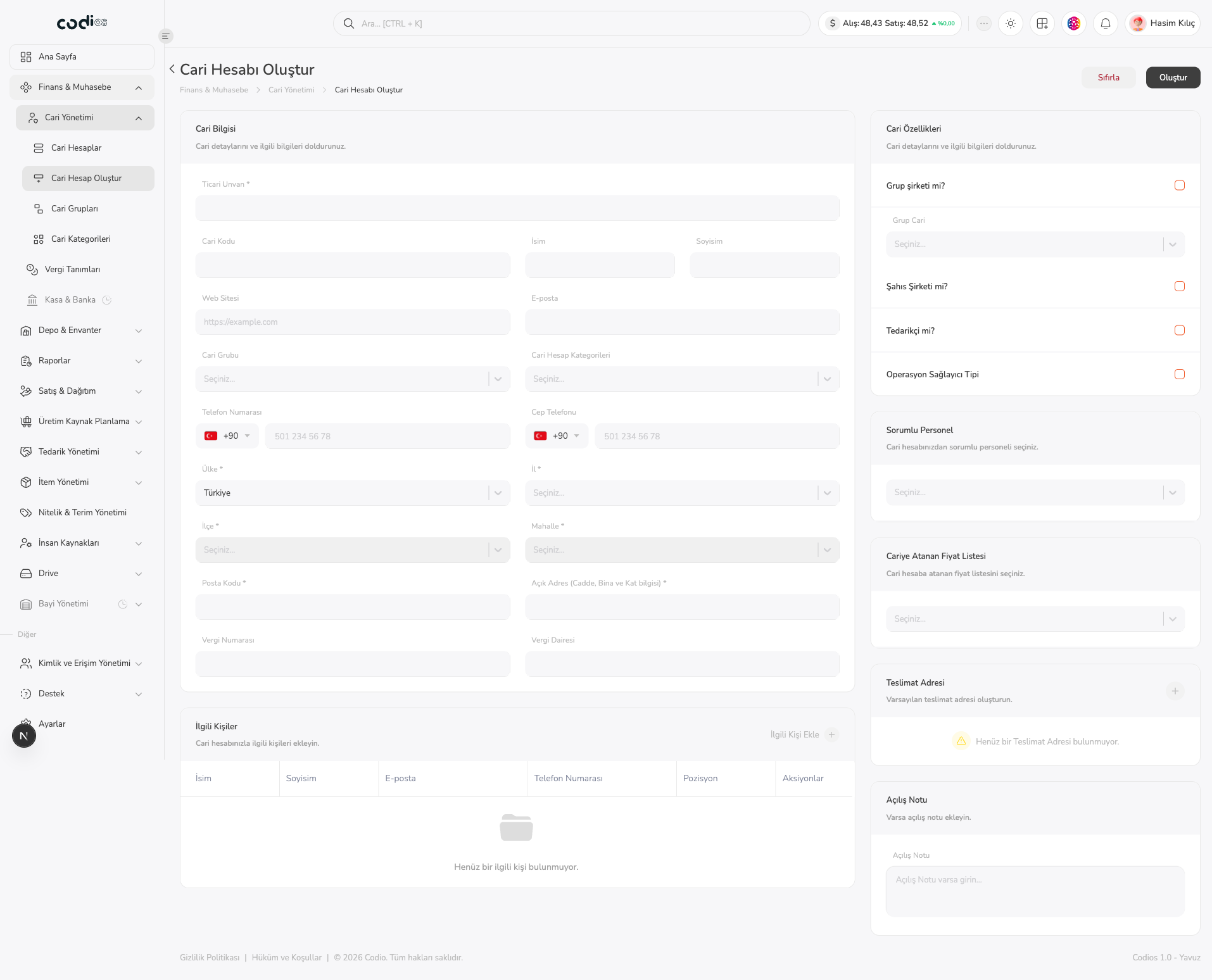 1234
- 1. Complete the required Ticari Unvan * field. Add the current code, first name, last name, website, and email when needed.
- 2. Select Cari Grubu and Cari Hesap Kategorileri, complete phone fields, and fill the required address fields.
- 3. Review the group company, sole proprietorship, and supplier options in Cari Özellikleri.
- 4. Add the responsible employee, assigned price list, delivery address, and opening note.
Required fields
- Ticari Unvan *
- Ülke *
- İl *
- İlçe *
- Mahalle *
- Posta Kodu *
- Açık Adres (Cadde, Bina ve Kat bilgisi) *
Tax number, tax office, contacts, and opening note are optional according to the account.
Create the record
- Select Oluştur after completing the form.
- Use Sıfırla to clear the form and start again.
- After creation, search for the current code and legal name in Current Accounts.
The create action was not submitted during live exploration, so no post-save notification or refresh result is stated as observed behavior.
Back to top